





Critical PHP Vulnerabilities in October 2026: Risks, Affected Versions & Security Fixes

PHP is one of the most widely used server-side programming languages, powering websites, content management systems, e-commerce platforms, and web applications. However, critical security vulnerabilities discovered in October 2026 have raised serious concerns for website owners, developers, hosting providers, and security professionals.
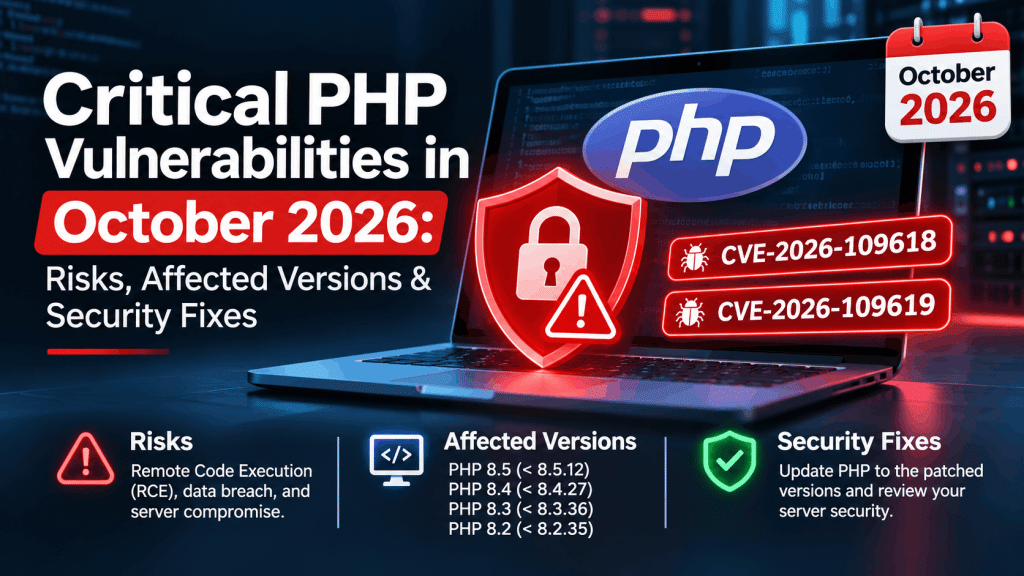
On October 21, 2026, the PHP development team released security updates addressing two critical vulnerabilities, CVE-2026-109618 and CVE-2026-109619. Both vulnerabilities carry a CVSS v4.0 severity score of 9.2 out of 10 and may allow attackers to execute malicious code on vulnerable PHP servers without authentication.
The vulnerabilities are commonly referred to as PHP2Shell. Security researchers have demonstrated exploitation techniques, making it essential for organizations to identify affected systems and apply the appropriate security updates.
If your website runs PHP, WordPress, Drupal, Joomla, or a custom PHP application, understanding these vulnerabilities is an important step toward protecting your website and sensitive data.
What Are the Critical PHP Vulnerabilities Discovered in October 2026?
The October 2026 security release addresses two serious flaws in PHP’s internal request-processing and memory-management mechanisms.
Unlike vulnerabilities that depend entirely on a weakness in a website’s application code, these issues affect the PHP runtime itself. Consequently, updating a WordPress plugin or changing application-level settings alone will not fully resolve the underlying problem.
The two primary vulnerabilities are:
- CVE-2026-109618: Remote code execution associated with out-of-memory error handling.
- CVE-2026-109619: Remote code execution associated with stale internal global state.
Both issues can create opportunities for an attacker to interfere with PHP’s internal processing and potentially execute code on a vulnerable server.
Understanding CVE-2026-109618: Out-of-Memory Handling Vulnerability
CVE-2026-109618 is associated with how PHP handles certain out-of-memory conditions during request processing.
PHP uses internal mechanisms to manage memory allocation and terminate processing when memory limits or allocation failures are encountered. Under particular circumstances, an out-of-memory event can interrupt request processing while internal data structures are only partially initialized.
If subsequent cleanup operations incorrectly handle that state, memory corruption may occur. Under the relevant conditions, an attacker may be able to exploit this behavior to achieve remote code execution.
Why Is This Vulnerability Dangerous?
A successful attack could potentially allow an attacker to execute unauthorized code within the affected PHP process. Depending on the server’s permissions and configuration, this could lead to:
- Unauthorized access to website files.
- Exposure of sensitive application data.
- Installation of malicious scripts or web shells.
- Further compromise of the hosting environment.
- Disruption of website operations.
The precise impact depends on the environment and the privileges available to the compromised process.
Understanding CVE-2026-109619: Stale Global State Vulnerability
CVE-2026-109619 involves PHP’s handling of internal state that may remain accessible after the memory associated with a request has been released.
In certain circumstances, internal variables or references may continue pointing to memory that is no longer valid. A subsequent request handled by the same worker may encounter this stale state before the runtime has properly reinitialized it.
This can result in unsafe memory access and potentially allow remote code execution.
Potential Security Risks
If successfully exploited, this vulnerability could threaten:
- Website and application integrity.
- Sensitive information handled by PHP workers.
- Server-side application functionality.
- The security of other resources accessible to the compromised process.
These risks make it important to review both the PHP version and the server configuration rather than assuming that application-level security measures are sufficient.
Which PHP Versions Are Affected?
According to the October 2026 PHP security advisories, the vulnerabilities affect multiple PHP release branches. The following table summarizes the affected and patched versions for the supported branches.
| PHP Branch | Affected Versions | Patched Version |
|---|---|---|
| PHP 8.5 | Earlier than 8.5.12 | 8.5.12 |
| PHP 8.4 | Earlier than 8.4.27 | 8.4.27 |
| PHP 8.3 | Earlier than 8.3.36 | 8.3.36 |
| PHP 8.2 | Earlier than 8.2.35 | 8.2.35 |
PHP 8.1 and older branches have reached end of life and no longer receive routine security fixes directly from the PHP project. Some operating-system vendors and long-term support providers may offer backported patches, so administrators should verify their specific distribution and support arrangements.
Important: The versions listed above are the minimum patched releases for these two vulnerabilities in the respective branches. Always verify the latest available security release before upgrading.
How Can These PHP Vulnerabilities Affect Websites?
The potential impact extends beyond standalone PHP applications. Many popular website platforms and business systems rely on PHP to process requests, manage data, and deliver dynamic content.
1. WordPress Websites
WordPress runs on PHP, so its security depends partly on the PHP runtime provided by the hosting environment. Updating WordPress core, themes, and plugins does not automatically patch an outdated PHP installation.
Website administrators should verify their hosting PHP version and coordinate with their hosting provider to apply the appropriate security update.
2. E-Commerce Websites
Online stores built with PHP-based platforms may process customer details, account information, orders, and payment-related data. A compromised server could put these resources at risk.
E-commerce administrators should prioritize security updates, access controls, backups, and monitoring.
3. Custom PHP Applications
Organizations operating custom PHP applications should review their production servers, background workers, containers, and staging environments. A server may remain exposed even if its application code has no known vulnerability of its own.
4. Shared Hosting Environments
Shared hosting customers may not have permission to update PHP themselves. In these cases, they should contact their hosting provider, request confirmation of the installed patched version, and check whether any legacy sites remain on unsupported PHP branches.
How to Check Your PHP Version
Before applying a fix, identify the PHP version used by your website.
Method 1: Check Through Your Hosting Control Panel
- Log in to your hosting control panel.
- Open the PHP configuration or PHP version management section.
- Identify the version assigned to your domain.
- Check whether the version meets the patched release requirement.
- Upgrade through the hosting provider’s supported process if necessary.
The exact menu names vary between hosting platforms.
Method 2: Check Through the Command Line
If you have SSH access to your server, run:
php -vThis displays the PHP version associated with the command-line environment.
However, the command-line version may differ from the PHP version used by your website. Verify the PHP version configured for the web server or PHP-FPM service as well.
Method 3: Check WordPress
For a WordPress website:
- Sign in to the WordPress dashboard.
- Navigate to Tools → Site Health → Info.
- Expand the Server section.
- Review the PHP version information.
If the displayed version is older than the relevant patched release, contact your hosting provider or administrator to arrange an update.
How to Fix the Critical PHP Vulnerabilities
The most important action is to update the PHP runtime to an appropriate patched release. Configuration changes and security plugins should not be treated as substitutes for applying the fix.
Step 1: Back Up Your Website
Before changing the PHP version, create a verified backup of your website files and database. For business-critical systems, also confirm that you can restore the backup if the upgrade causes compatibility problems.
Step 2: Upgrade PHP to a Patched Version
Upgrade to the appropriate patched release:
- PHP 8.5.12 or later in the 8.5 branch.
- PHP 8.4.27 or later in the 8.4 branch.
- PHP 8.3.36 or later in the 8.3 branch.
- PHP 8.2.35 or later in the 8.2 branch.
Choose a currently supported release compatible with your application and hosting environment. If you use a vendor-maintained PHP package, confirm that it includes the relevant security fixes.
Step 3: Restart Relevant Services
Depending on your deployment, the update may require restarting PHP-FPM, the web server, application containers, or other services so that patched binaries and configuration are loaded.
Follow your hosting provider’s or operating system vendor’s instructions.
Step 4: Test Your Website
After updating PHP, test important functionality, including:
- Website pages and navigation.
- Contact forms and user registration.
- Login and authentication.
- File uploads and downloads.
- E-commerce checkout and payment integrations.
- API endpoints and background jobs.
Review application and server logs for errors introduced by the upgrade.
Step 5: Verify the Fix
Confirm the PHP version used by the web-facing application and check your vendor’s security advisory or package changelog. Record the update date and the systems that were patched.
For websites running on multiple servers, ensure that every production instance has been updated.
Step 6: Review Security Logs
Because technical details and proof-of-concept research are publicly available, administrators should review web server, PHP, authentication, and endpoint logs for suspicious activity.
Investigate unexpected processes, unfamiliar files, unusual outbound connections, unexplained account changes, or other signs of compromise.
If you suspect exploitation, preserve relevant logs, follow your incident-response procedure, and seek qualified security assistance before treating the system as clean.
Are Temporary Mitigations Available?
Temporary mitigations may reduce exposure to particular attack paths, but they do not eliminate the underlying vulnerabilities.
The PHP security guidance includes configuration-level measures for specific scenarios, such as disabling session upload progress where applicable and adjusting certain request-processing settings. The appropriate measures depend on the vulnerability, PHP version, application behavior, and server configuration.
Administrators should follow the official PHP advisory and avoid copying configuration changes without understanding their operational impact.
Do not rely on a web application firewall, a security plugin, or a configuration workaround as a complete fix. Updating to a patched release remains the primary remediation step for CVE-2026-109618 and CVE-2026-109619.
Best Practices to Improve PHP Website Security
The October 2026 vulnerabilities highlight the importance of maintaining the entire website infrastructure, not just application code.
-
Keep PHP and Dependencies Updated
Use supported PHP releases and regularly update frameworks, libraries, CMS platforms, themes, and plugins. Remove abandoned components that are no longer required.
-
Use the Principle of Least Privilege
Run PHP processes with only the permissions they need. Separate application services where practical, and avoid running website processes with unnecessary administrative privileges.
-
Protect Sensitive Configuration Files
Store database credentials, API keys, and other secrets securely. Restrict access to configuration files and prevent sensitive files from being publicly served.
-
Maintain Reliable Backups
Keep regular backups in a separate, protected location. Test restoration procedures periodically to ensure that backups are usable during an incident.
-
Monitor Security Advisories
Subscribe to official PHP security announcements and relevant vendor advisories. Apply critical updates promptly, especially when vulnerabilities affect internet-facing services.
- Use Web Application Security Controls
Use appropriate request filtering, access controls, rate limiting, secure file permissions, and monitoring. These controls strengthen defense in depth but cannot replace vulnerable runtime updates.
Frequently Asked Questions
-
What are the critical PHP vulnerabilities announced in October 2026?
The two main vulnerabilities are CVE-2026-109618 and CVE-2026-109619. Both are rated 9.2 under CVSS v4.0 and may allow remote code execution in affected PHP environments.
-
What is PHP2Shell?
PHP2Shell is the name used in security reporting for the critical PHP vulnerabilities involving unsafe memory handling and internal runtime state. Successful exploitation may allow an attacker to execute code on a vulnerable server.
-
Which PHP versions should be updated?
For the affected supported branches, the relevant patched releases are PHP 8.5.12, 8.4.27, 8.3.36, and 8.2.35. Administrators should confirm the latest available security release and their vendor’s patch status before upgrading.
-
Are WordPress websites affected?
WordPress websites may be at risk when the PHP runtime provided by their hosting environment is vulnerable. Updating WordPress plugins alone does not fix a vulnerability in the PHP runtime.
-
Can a security plugin fix these vulnerabilities?
No. A security plugin may offer useful additional protection, but it cannot replace the PHP runtime update required to correct these vulnerabilities.
-
What should I do if my hosting provider has not released an update?
Contact the provider and request a clear remediation timeline and confirmation of the PHP package being used. If the affected application cannot be patched promptly, consider isolating it from public access until a fix is available and verified.
-
Is PHP 8.2 still safe to use?
PHP 8.2.35 addresses these two vulnerabilities in the 8.2 branch. However, PHP 8.2 is approaching its announced end-of-life date of December 31, 2026. Plan a migration to a supported branch rather than relying indefinitely on an older release.
The critical PHP vulnerabilities disclosed in October 2026 demonstrate how weaknesses in a server-side runtime can affect websites, applications, and hosting environments. CVE-2026-109618 and CVE-2026-109619 may permit remote code execution, making prompt remediation essential.
Website owners and administrators should identify their PHP versions, install the appropriate security updates, test their applications, and review logs for signs of suspicious activity. Organizations running unsupported PHP versions should also plan a migration to a supported release.
Maintaining an updated PHP environment, applying defense-in-depth security controls, and monitoring official advisories are essential steps toward reducing the risk of future attacks.
Stay informed, patch promptly, and make PHP security a regular part of your website maintenance strategy.

